

Best Digital Inspection Software in 2026: Top Platforms Compared
Compare seven leading platforms across ten inspection capabilities — from checklist capture to closed-loop defect management — and find the right fit for quality, safety, and maintenance.

What is Digital Inspection Software?
Digital inspection software is a type of software that guides frontline employees through equipment, quality, and safety inspections on mobile devices. These tools replace paper and spreadsheets with structured digital workflows. They standardize how inspections are performed, capture findings with photos and data, and in many cases route the issues an inspection surfaces to the people who can act on them.
The category is also referred to as inspection management software, mobile inspection apps, digital audit and inspection tools, or field inspection software. It now ranges from simple checklist apps to AI-directed inspection workflows with closed-loop defect management.


Digital inspection capability originated from multiple sources, and the differences in origin still define what each tool does well. One group grew out of digital forms and checklists. These platforms replaced paper with mobile equivalents and are strong at fast data capture, but thinner on what happens after a defect is found. The other group came from maintenance and CMMS systems, where an inspection mainly exists to trigger a work order. Knowing which of these two origins a platform comes from is the fastest way to predict where its inspection workflow is strong and where it stops.
As manufacturers and operators face workforce turnover, skills gaps, and rising quality and compliance demands, it may not be enough to digitize an inspection form. It becomes critical to understand what the platform does during the inspection and with the data. The platforms that treat inspection as the front end of a closed loop, meaning capture, route, fix, verify, and learn, operate in a different category from those that simply store a completed checklist.
Platforms Covered in This Guide
Comparison at a glance
7 platforms · 10 inspection capabilities. Click a vendor to spotlight its column.
ROO.AI publishes this guide. Capabilities and limitations are shown for every platform — including ours — and ratings are sourced from G2 & Capterra.
| Capability | |||||||
|---|---|---|---|---|---|---|---|
| Digital Inspections & Checklists | ✓ | ✓ | ✓ | ✓ | ✓ | ✓ | ✓ |
| Conditional / Branching Logic | ✓ | ◐ | ✓ | ✓ | ✓ | ✓ | ✓ |
| Photo & Video Defect Capture | ✓ | ✓ | ✓ | ✓ | ✓ | ✓ | ✓ |
| Corrective Action & Issue Mgmt | ✓ | ✓ | ◐ | ◐ | ✓ | ◐ | ✓ |
| QC Defect-to-Repair Automation | – | – | – | – | – | – | ✓ |
| Maintenance Work Orders & Scheduling | – | ✓ | – | – | ✓ | – | ✓ |
| AI-Directed Inspection Guidance | – | – | – | – | – | – | ✓ |
| AI Copilots (Specs / SOPs / Manuals) | – | ◐ | – | – | – | – | ✓ |
| Edge AI / Vision Inspection | – | – | – | – | – | – | ✓ |
| Embedded Training & On-Demand Tips | ◐ | ◐ | ◐ | – | – | – | ✓ |
| Ratings · G2 / Capterra | 4.6 / 4.6 | — / 4.8 | — / ~4.5 | — / 4.4 | — / — | — / ~4.7 | 4.9 / 4.8 |
A 7-column table doesn’t fit a phone. Pick a platform to compare against ROO.AI.
Key: ✓ full built-in · ◐ partial / add-on · – not native. “–” ratings = no current public average confirmed.
How to Choose the Right Digital Inspection Software for Your Operation
Assuming all digital inspection tools share a common foundation, and the differences are a matter of degree, can lead to a poor decision. As the introduction outlined, these platforms come from two main origins, digital forms on one side and mobile CMMS on the other, and those origins shape what each does well natively. Mobile access and offline capture are a shared baseline. The first real evaluation question is scope. Are you solving one narrow inspection problem, or do you need a single platform that spans quality, maintenance, and safety inspections together? Consider which capabilities are native versus approximated with custom forms, and map your requirements against dedicated manufacturing quality inspection software before you shortlist.
The second question is what happens after the inspection finds an issue. A defect that sits in a completed checklist creates little value. A defect that is routed to the right team, acted on, verified, and recorded accomplishes more. The key is to examine the built-in capabilities the platform offers to act upon the data that is collected in an inspection. For example, generating work orders to repair equipment issues, corrective actions to address quality defects or safety alerts to respond to hazard reporting. In the comparison above, that is the QC defect-to-repair automation row.
Finally, can the platform guide the inspection in real time using logic or AI, and does it embed training and on-demand tips in the flow of work so a less-experienced worker performs like an experienced one? The ability to make the worker’s job easier, simple usability and an intuitive visual interface are the top aspects that contribute to successful adoption and use of digital tools on the frontline.
Digital Inspection Software: Vendor Snapshots
Overview: SafetyCulture, best known for its iAuditor app, built one of the largest user bases in the category, which the company cites at tens of thousands of organizations, largely through a freemium model that put digital checklist creation in reach of any supervisor with a smartphone. For inspections it one of the most popular fast-deployment options, with a deep template library, conditional logic and scoring, photo capture, and reliable offline mode. Over time it has added corrective actions, asset tracking, sensor integrations, a training module, and AI inspection template generation.
Best for: Teams that want fast, low-cost, easy-to-deploy digital inspections and safety audits across sites, particularly those making a first move off paper.
Drag-and-drop inspection and checklist builder with conditional logic and scoring. Offline inspections with photo capture. Corrective action assignment. Large template library plus AI-generated templates. Asset tracking and sensors.
SafetyCulture is a digital inspection-and-forms platform, and that is its ceiling as well as its strength. It captures inspection data and assigns corrective action tasks, but a failed check cannot flow into a defect-response workflow natively. There is no production QC defect-to-repair routing with closed-loop verification, and no maintenance work-order management or preventive-maintenance scheduling to turn a finding into an assigned, tracked repair. It also lacks AI-directed in-process inspection guidance.
Overview: MaintainX is a mobile-first CMMS and asset-management platform founded in 2018 and widely used in manufacturing, facilities, and food and beverage. Its inspection capability is built around the work order, with procedure-based digital checklists, pass/fail criteria, photo and voice-note capture, and the ability to automatically trigger a corrective work order when an inspection step fails. The company has invested in AI for procedure generation, anomaly detection, and natural-language analytics. In May 2026, Autodesk announced a definitive agreement to acquire MaintainX pending regulatory approval and had not closed.
Best for: Maintenance and facilities teams that want inspections tightly linked to work orders, asset history, and preventive maintenance.
Procedure-based digital inspections and checklists. Automated work-order creation on inspection failure. Photo, voice-note, and offline capture. Preventive and condition-based scheduling. AI procedure generation and analytics.
MaintainX is maintenance-first. Its strongest closed loop is inspection-to-work-order for assets, not production QC defect-to-repair with quality verification, and it does not offer AI-directed in-process inspection branching or on-device vision inspection. Inspection workflows are limited to forms with no embedded training or visualizations. Per-user pricing can escalate for large frontline teams, and several capabilities sit in higher tiers.
Overview: TrueContext, formerly ProntoForms, is a Canadian field-workflow platform founded in 2001 in Ottawa and rebranded in 2023. It is used heavily for inspections and data capture in oil and gas, utilities, medical equipment, and industrial field service. It is one of the stronger tools in the category for building conditional, offline-capable inspection forms with photos, signatures, GPS, and calculated fields, and for routing completed forms into enterprise systems such as Salesforce, ServiceNow, and Microsoft. The company cites more than 100,000 users.
Best for: Field and asset-inspection teams that need highly configurable, offline-capable inspection forms feeding enterprise systems of record.
Low-code mobile inspection forms with conditional logic and calculated fields. Offline data capture with photos, signatures, and GPS. Multi-format report generation in PDF, Word, and HTML. Dispatch and notifications. Deep enterprise integrations.
TrueContext excels at capturing inspection data but is fundamentally a forms-and-data platform. Reviewers and analysts note that it does not natively handle corrective-action workflows, task scheduling, or multi-location operational hierarchy. Neither defect pathway is native. There is no QC defect-to-repair automation and no maintenance work-order or preventive-maintenance scheduling, so findings must be pushed to other systems to be acted on. It also offers no AI-directed inspection guidance or on-device vision inspection.
Overview: GoCanvas is a mobile-first field-operations and forms platform that was acquired by the Nemetschek Group in 2024. It pairs a drag-and-drop form builder and an AI PDF-to-form converter with a large library of prebuilt app templates, and it is widely used across construction, field service, and manufacturing for inspections, safety checks, work-order forms, and daily reports. Its strengths are offline capture, ease of use for non-technical users, and capture of photos, signatures, GPS, and barcodes.
Best for: Construction, field service, and distributed teams that want to replace paper forms with flexible mobile data collection and clean reports, particularly in low-connectivity environments.
Drag-and-drop mobile form builder with an AI PDF converter. Conditional logic and offline data capture. Photo, signature, GPS, and barcode capture. Large prebuilt template library. Integrations and exports in CSV and PDF to back-office systems.
GoCanvas is a forms-and-data-collection platform at its core. It captures inspection data well, but it does not provide native production QC defect-to-repair routing with verification, native maintenance work orders or preventive-maintenance scheduling, or AI-directed in-process inspection guidance. Reviewers note that reporting and analytics depth is limited, and some raise concerns about contract terms and seat-reduction policies.
Overview: Inspectivity is a cloud and mobile inspection and asset-management platform used most heavily in energy, oil and gas, minerals, and engineering for asset-integrity work. It pairs a no-code form builder and configurable asset hierarchies with the ability to schedule, prioritize, and assign maintenance tasks and work orders. Inspectors capture findings with photos and videos against specific assets, use barcodes and RFID to start inspections, and track issues and corrective actions to closure. The platform is ISO 9001 and 27001 certified and integrates with ERP, risk-based-inspection, and 3D-modeling systems through a REST API.
Best for: Asset owners and inspection service providers in energy, oil and gas, and heavy industry that need configurable asset-integrity inspections tied to maintenance planning.
No-code inspection form builder with configurable asset hierarchies. Maintenance task scheduling, prioritization, and work orders. Photo and video capture attached to assets, with barcode and RFID support. Issue and corrective-action tracking. REST API integration with ERP, RBI, and 3D-modeling tools.
Inspectivity is built for asset-integrity inspection and maintenance rather than production quality. It does not provide production QC defect-to-repair routing with closed-loop verification, AI-directed in-process inspection guidance, AI copilots for specs and manuals, on-device vision inspection, or embedded in-flow training. The mobile app is Android-focused, and public third-party review volume is limited.
Overview: Fulcrum, from Spatial Networks, is a field-first, GIS-centric platform for mobile data collection and inspections, used widely in utilities, environmental services, construction, and civil engineering. It pairs a no-code, drag-and-drop form builder with strong geospatial capture, reliable offline mode, and deep Esri ArcGIS integration as a Silver Partner. Its AI tools focus on data entry and analysis, including FastFill voice and photo autofill, object recognition, and Insights for plain-language querying of field data. The company reports use by nearly 3,000 companies and more than 50,000 users, and it has acquired the environmental software firm Wildnote.
Best for: Field, utility, environmental, and survey teams that need configurable, GIS-rich inspection and data-collection forms with offline capture.
No-code drag-and-drop form builder with conditional logic. Offline mobile capture with GPS, photos, video, and barcodes. Deep GIS integration as an Esri Silver Partner. FastFill AI autofill, object recognition, and Insights natural-language analytics. REST API and more than 20 enterprise integrations.
Fulcrum is fundamentally a field data-collection platform. It captures inspection data well, but it does not provide native production QC defect-to-repair routing with verification, maintenance work orders or preventive-maintenance scheduling, or shipped AI-directed in-process inspection guidance, which the company lists as a roadmap item. Reviewers note that advanced reporting can require professional services and that per-user pricing can rise at scale.
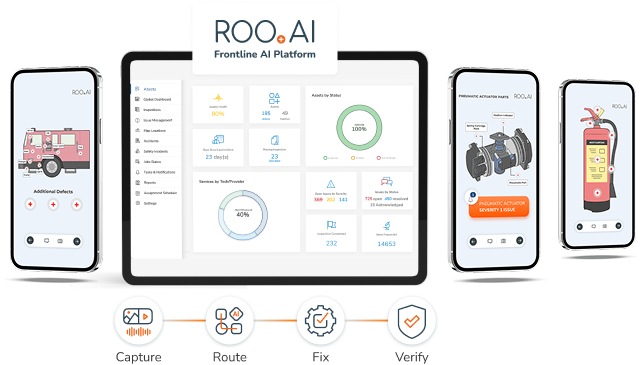
Overview: ROO.AI is a Frontline AI Platform that operationalizes artificial intelligence inside daily frontline work. Its defining strength is flexibility and breadth. Rather than being built around a single function, ROO.AI runs inspections across quality, safety, and maintenance on one platform, a single pane of glass, and applies the same visual, AI-guided workflows to a wide range of frontline use cases. For inspections specifically, ROO.AI treats the inspection as the front end of a closed loop. It guides the inspection with AI-directed, branching workflows, captures defects with image and video, and closes both defect pathways. It routes a quality defect to production or rework with verification, and it turns an equipment finding into a scheduled maintenance task or repair work order — closed-loop defect management in practice. It is recognized as a Top Manufacturing Connected Worker Platform for 2026 by Manufacturing Technology Insights and a Top Ten Manufacturing Solution for 2025 by Manufacturing Business Outlook. See the ROO.AI Frontline AI Platform for inspections in detail.
Best for: Operations that want one flexible platform to run inspections across quality, safety, and maintenance, route defects through both production rework and maintenance, and bring AI guidance to the frontline across functions and industries.
Flexible visual, AI-guided inspection workflows that apply across quality, safety, and maintenance inspections. AI-directed in-process logic and branching. Automated QC defect-to-repair routing with closed-loop verification. Native maintenance scheduling and repair work orders. AI Copilots for natural-language access to specs, SOPs, and manuals. Edge AI for on-device image recognition and job verification. Embedded micro-training and on-demand tips in the flow of work. Concierge digitalization service.
ROO.AI is built for complex inspections and closed-loop execution for action against inspection findings for quality control, equipment maintenance and behavioral safety risk management. There is no current self-authoring tool for inspection workflow creation, ROO.AI offers a concierge service as part of its subscription to implement all workflows making it more applicable to broader departmental or organizational projects rather than smaller, DIY paper checklist replacements. The company reports that an AI-based self-authoring function is on the roadmap.
ROO.AI Frontline AI Platform, inspection and closed-loop defect management. Learn more
Frequently Asked Questions
Digital inspection software is a category of platforms that guide frontline employees through equipment, quality, and safety inspections on mobile devices, replacing paper checklists with structured, traceable digital workflows. It is also called inspection management software, mobile inspection apps, or digital audit and inspection tools, and it ranges from simple mobile checklists to AI-directed inspection workflows with closed-loop defect management. Leading platforms in 2026 include SafetyCulture, MaintainX, TrueContext, GoCanvas, Inspectivity, Fulcrum, and ROO.AI.
The leading digital inspection platforms for 2026 include SafetyCulture (fast digital checklists and safety audits), MaintainX (maintenance inspections tied to work orders), TrueContext (configurable field inspection forms and data capture), GoCanvas (mobile forms for construction and field service), Inspectivity (asset-integrity inspection with maintenance planning), Fulcrum (GIS-based field inspection and data collection), and ROO.AI (end-to-end inspection to defect management for quality, safety, and maintenance). The best fit depends on whether you need a single inspection capability or one platform spanning multiple functions.
They differ more than they appear to. Most trace back to one of two origins, namely digital forms and checklists or mobile CMMS and maintenance, and that origin determines what each does natively and where its ceiling is. The comparison in this guide rates platforms across ten inspection-focused dimensions, including conditional inspection logic, corrective action management, QC defect-to-repair automation, maintenance work orders and scheduling, AI-directed guidance, AI copilots, edge AI vision, and embedded training, which reveal significant differences between tools that look similar at first glance.
Start with scope. Do you need to solve one inspection problem, or do you want a single platform spanning quality, maintenance, and safety inspections? Then evaluate native versus add-on capability in those areas, since native integration matters more than a long feature list. Most importantly, evaluate what happens after a defect is found, meaning whether the platform can route it to repair and verify the fix. If you have an AI strategy, also evaluate whether the platform can direct inspections through AI and capture structured execution data to improve over time.
Closed-loop defect management means a defect found during an inspection is routed to the responsible team, acted on, verified, and recorded, rather than simply logged in a completed checklist. There are two pathways. The quality pathway sends a production defect to a production or rework team and verifies the fix. The maintenance pathway turns an equipment finding into a scheduled task or repair work order that is assigned and tracked. Many inspection tools support neither natively, and a CMMS-based tool may handle the maintenance pathway but not the quality one. It matters because the value of an inspection is realized only when findings drive action. ROO.AI is built to close both pathways as a single inspection platform — for background on that wider category, see what is a frontline AI platform.
Generally it complements a QMS rather than replacing it. A QMS manages documentation, policies, and compliance records. A digital inspection platform operationalizes quality at the point of work by guiding inspections, capturing defect data, routing repairs, and building traceability automatically. Platforms like ROO.AI are designed to integrate with an existing QMS while extending inspection and defect management directly into frontline workflows.
Many mobile CMMS platforms are also considered when evaluating digital inspection software. In most cases, the products with digital forms origins do not have the functionality necessary to replace a CMMS and in many cases there is no significant benefit from using a separate inspection form builder over the inspections that mobile CMMS solutions provide. Platforms such as ROO.AI that include preventive maintenance, parts and vendor management and work order management may be able to fill the role of a CMMS for many companies. Customers are advised to consider their CMMS requirements and weigh the capabilities of the vendor products carefully.