

Best Digital Inspection Software for Quality Control in 2026: Top Platforms Compared
Compare seven leading platforms across eight quality capabilities — from checklist capture to closed-loop defect management — and find the right fit for incoming, in-process, and final inspection.
What is Quality Inspection Software?
Inspection software for quality control digitizes the checks manufacturers run to catch defects, carried out on a phone or tablet. The software standardizes how each inspection is run, records results and defect photos, and keeps a searchable history. Buyers also look for this category under names such as quality control inspection software, inspection management software, or mobile audit and inspection tools.
Most digital inspection software was created to get rid of paper and to automate data collection. Guiding the worker step by step with logic or AI is a newer capability that only some platforms offer. Products in the category have different origins. Digital forms are quick at capturing data. Audit programs are strong at scheduling and tracking findings. For CMMS systems an inspection mostly exists to open a work order. Each starting point shapes what a tool does well and where it stops.

The enterprise QMS is worth singling out, because many quality teams already run one. An EQMS is built to govern quality through controlled documents, audit records, and formal corrective-action workflows. What an EQMS is not built to do is direct action at the point of work. It holds the policies, the procedures, and the records, but the inspection itself and the fix that follows happen on the floor.
So the useful question for a 2026 buyer is what the tool does once a defect appears. Can it guide the inspection as it happens, direct the corrective action and confirm the fix, and turn that execution into data that sharpens the next inspection? Tools that close that loop sit in a different class from tools that simply file a finished checklist.
Platforms Covered in This Guide
Digital Inspection Software for Quality Control — Comparison at a Glance
7 platforms · 8 quality capabilities. Click a vendor to spotlight its column.
ROO.AI publishes this guide. Capabilities and limitations are shown for every platform — including ours — and ratings are sourced from G2 & Capterra.
| Capability | |||||||
|---|---|---|---|---|---|---|---|
| Digital Quality Inspections & Checklists | ✓ | ✓ | ✓ | ✓ | ✓ | ✓ | ✓ |
| Conditional / Branching Inspection Logic | ✓ | ◐ | ◐ | ✓ | ◐ | ◐ | ✓ |
| Photo & Video Defect Capture | ✓ | ◐ | ✓ | ✓ | ◐ | ◐ | ✓ |
| CAPA & Corrective Action Management | ◐ | ✓ | – | ◐ | ✓ | ✓ | ◐ |
| QC Defect-to-Repair Automation | – | – | – | – | – | – | ✓ |
| AI-Directed Inspection Guidance | – | – | – | – | – | – | ✓ |
| AI Copilots (Specs / SOPs / Tolerances) | – | – | ◐ | – | – | – | ✓ |
| Embedded Examples & Micro-training | ◐ | ◐ | ◐ | ◐ | – | – | ✓ |
| Ratings · G2 / Capterra | 4.6 / 4.6 | — / 4.5 | — / 4.8 | — / ~4.5 | ~4.3* | — / 4.5 | 4.9 / 4.8 |
A 7-column table doesn’t fit a phone. Pick a platform to compare against ROO.AI.
Key: ✓ full built-in capability · ◐ partial or add-on capability · – not available or not a primary capability. Ratings note: G2 / Capterra averages are shown where a current public average could be sourced, and a “–” means an average was not confirmed at research time. *Intelex is reviewed across several EHSQ categories rather than a single quality product, so the figure shown is an approximate aggregate.
How to Choose the Right Digital Inspection Software for Quality Control
Start by considering scope. Several of these products are excellent at one job, whether that is running a layered process audit, capturing a safety checklist, or turning a failed equipment check into a work order. But if you want one place to run incoming, in-process, and final quality, and to handle the corrective action that follows, the question is what capabilities are built in and which would have to be rebuilt with custom forms, if possible at all. It is worth mapping your requirements against dedicated digital quality inspection software before shortlisting.
Next, look at what happens after an inspection finds a problem, because this is the dividing line. After recording the findings, some can also open a corrective-action task. Enterprise QMS tools go further on the paperwork, managing a full CAPA workflow with investigation, approvals, and closure records. What almost none of them do is direct the fix at the point of work, route the defect to the rework team, and confirm that the fix was actually made — a closed-loop defect to repair pathway. Of the solutions being evaluated here, this last capability is a strength of ROO.AI.
Finally, evaluate the user experience, because adoption drives effectiveness. A text-heavy checklist, will be slow to adopt. The platforms worth shortlisting present the inspection visually, let workers answer with a tap, adapt to role and experience, and place short examples and micro-training right inside the process. For teams with an AI agenda, the last test is whether the software can guide the inspection with AI in the moment and learn from what it captures, rather than simply storing another form.
Digital Inspection Software for Quality Control — Vendor Snapshots
Overview: SafetyCulture built its reach on the iAuditor app and a free tier that let any supervisor turn a paper checklist into a digital one in minutes. For quality control it remains the quickest way onto the first rung, with a large template library, scored conditional checklists, photo capture, and dependable offline use. Newer additions include corrective actions, asset tracking, sensors, and a microlearning module.
Best for: Teams that want digital quality and safety checks live across many sites in days rather than months, especially first-time movers off paper.
Drag-and-drop inspection and checklist builder with conditional logic and scoring. Offline inspections with photo capture. Corrective action assignment. Large template library plus AI-generated templates. Asset tracking and sensors.
SafetyCulture is, at heart, a checklist and forms tool. It records a finding and can assign a corrective task, but it does not route a production defect to repair and confirm the fix, and it has no AI that directs the inspection while it is underway. For a team that only needs clean digital checklists, that ceiling is fine. For one that needs the inspection to drive action, it arrives quickly.
Overview: Ease, at ease.io and in business since 1986, built its name on the layered process audit, the method in which supervisors and managers audit high-risk processes on a rotating schedule so each layer checks the others. The platform digitizes LPAs along with safety checks, Gemba walks, and 5S, automates the audit calendar layer by layer, chases missed audits, and tracks findings to closure. It is a fixture in automotive plants, used by companies such as Dana, Tenneco, and Eaton, and it maps to IATF 16949 and ISO 9001. Teams evaluating this approach can also compare it with dedicated layered process audit software.
Best for: Quality teams that run layered process audit programs and plant-floor audits at scale, particularly automotive and aerospace suppliers with IATF 16949 or AS9100 audit requirements.
Native layered process audit scheduling, including scheduling by layer. Mobile auditing on iOS and Android with offline support. Picture capture and annotation, with reference images on questions. Corrective action and mitigation tracking to closure. Customizable dashboards and a central question library.
Ease is built around audits rather than the wider job of frontline quality execution. It does not route a production defect to repair and verify the fix, guide the inspection with AI in process, or offer copilots for specs and manuals. Reviewers point to limited reporting customization, scheduling that can feel time-consuming, and the absence of a public API.
Overview: MaintainX is a mobile-first maintenance platform, or CMMS, launched in 2018 and used widely across manufacturing and food and beverage. Its inspection model is built around the work order: a procedure-based checklist with pass/fail steps, photo and voice notes, and an automatic corrective work order when a step fails. The company has leaned into AI for procedure generation and analytics. In May 2026, Autodesk announced an agreement to acquire it, subject to regulatory approval.
Best for: Maintenance and facilities teams that want equipment inspections tied tightly to work orders, asset history, and preventive maintenance.
Procedure-based digital inspections and checklists. Automatic work-order creation on inspection failure. Photo, voice-note, and offline capture. Preventive and condition-based scheduling. AI procedure generation and analytics.
MaintainX is maintenance-first, and that frames its quality fit. Its strongest loop is inspection to work order on an asset, not a production quality defect routed to rework and verified. It does not guide the inspection with AI in process, and its inspections are forms with little in-flow training. Per-user pricing can climb for large frontline teams.
Overview: TrueContext, the platform formerly called ProntoForms, has been building mobile inspection forms since 2001 and took its current name in 2023. It is a favorite in field-heavy sectors such as oil and gas, utilities, and field service for its conditional, offline forms with photos, signatures, GPS, and calculated fields, and for pushing finished records into systems such as Salesforce, ServiceNow, and Microsoft. The company cites more than 100,000 users.
Best for: Field and asset-inspection teams that need highly configurable, offline-capable quality and inspection forms that feed enterprise systems of record.
Low-code mobile inspection forms with conditional logic and calculated fields. Offline capture with photos, signatures, and GPS. Report generation in PDF, Word, and HTML. Dispatch and notifications. Deep enterprise integrations.
TrueContext is, at core, a forms and data platform. Reviewers and analysts note that it does not natively handle corrective-action workflows, task scheduling, or multi-site hierarchy. It does not route a production defect to repair, guide the inspection with AI, or deliver in-flow examples and micro-training. Findings have to be pushed elsewhere to be acted on.
Overview: Intelex, founded in 1992 in Toronto and owned by Fortive since 2019, is an enterprise EHSQ platform that brings environment, health, safety, and quality into one configurable, web-based system. On the quality side it provides nonconformance tracking, audit management, document control, CAPA, and compliance reporting through a code-free workflow engine that teams tailor to their processes. It serves large multi-site organizations and integrates with systems such as SAP and PeopleSoft, and the company reports roughly 1,400 clients and more than 3.5 million users.
Best for: Large enterprises that want a single system of record for environment, health, safety, and quality, run primarily by dedicated EHS and quality teams across multiple sites.
Configurable, code-free EHSQ platform. Nonconformance and CAPA tracking. Audit and inspection management. Document control and compliance reporting. Analytics dashboards and ERP integration.
Intelex is a system of record whose interface is built for EHS and quality managers at a desk rather than for workers running inspections on the floor. Reviewers and third-party analysts note a steep configuration curve, long implementations, and per-user costs that climb for field-heavy teams. It manages nonconformance and CAPA records well, but like other enterprise QMS tools it cannot deliver a CAPA to a frontline worker to execute and verify at the point of work. It offers no point-of-work defect-to-repair routing, no AI-directed inspection guidance, and no in-flow examples or micro-training.
Overview: ETQ, whose ETQ Reliance product was renamed Octave Reliance after Hexagon spun off its Octave division in May 2026, is one of the most established enterprise quality management systems. Founded in 1992, it offers more than 40 configurable applications covering document control, CAPA, nonconformance, audit management, training, supplier quality, and risk, and it serves more than 600 customers in regulated industries such as medical device, pharmaceuticals, electronics, automotive, and food and beverage. LNS Research ranked it a Front Runner in its 2025 EQMS evaluation.
Best for: Regulated enterprises that need a configurable system of record for quality documentation, CAPA, audits, and compliance, run by a central quality organization.
Document control and change management. Configurable CAPA workflows from initiation through investigation, verification, and closure. Audit management and supplier quality. Training management and risk assessment. Advanced analytics on a no-code platform.
ETQ governs the records of quality, not the action on the floor. It manages controlled documents and full CAPA workflows well, but that workflow lives in the back office. ETQ can route a CAPA through investigation, approval, and closure, yet it cannot deliver that corrective action to a frontline worker to execute and verify at the point of work, which is exactly the hand-off from the system of record to the place where the fix actually happens. ETQ’s own answer to that gap is a partnership with the connected worker platform Augmentir to carry its quality processes to frontline workers, which underlines that the system of record and the system of execution are two different layers. Reviewers also describe the interface as hard for new users to navigate and note long configuration cycles and rising license costs.
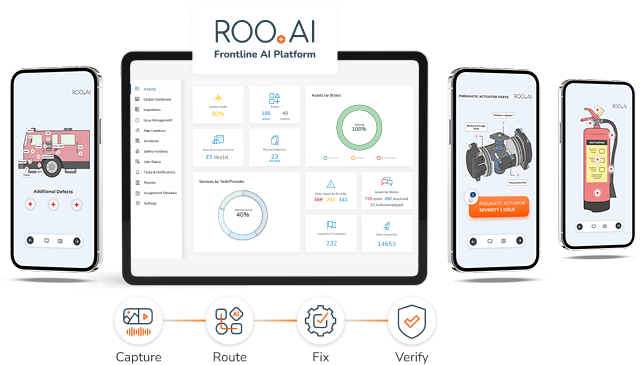
Overview: ROO.AI is a Frontline AI Platform that operationalizes artificial intelligence inside daily frontline work, and for quality control it is built to do the thing the systems of record do not. It guides inspections and LPAs with AI-directed, branching workflows, captures defects with image and video, routes a quality defect to production or rework with verification, and closes the loop from finding to confirmed fix. A visual, image-led interface presents each inspection point on a picture of the actual product or equipment, which makes the check faster to learn and harder to skip, and short examples and micro-training sit inside the step itself. ROO.AI is designed to work alongside an existing QMS, extending quality execution to the point of work and feeding clean data back. It is recognized as a Top Manufacturing Connected Worker Platform for 2026 by Manufacturing Technology Insights and a Top Ten Manufacturing Solution for 2025 by Manufacturing Business Outlook. See the AI-powered quality control software in detail.
Best for: Make-to-order and discrete manufacturers that want to operationalize quality at the point of work, route defects through closed-loop fix and verification, and bring AI guidance to frontline quality teams alongside their existing QMS.
Visual, AI-guided inspection and LPA workflows across incoming, in-process, and final checks. AI-directed in-process logic and branching. Automated QC defect-to-repair routing with closed-loop verification. Delivery of corrective actions to the frontline worker, with verification that the action was taken. AI Copilots for natural-language access to specs, tolerances, SOPs, and manuals. Embedded reference examples and micro-training in the flow of work. Edge AI for on-device image recognition. Automated NCR and traceability records. Concierge digitalization service.
ROO.AI is a frontline execution layer rather than an enterprise system of record. It simplifies inspections and automates the data collection, routes defects to production for in-process rework, delivers corrective actions to the worker and verifies they are taken, and it builds NCR and traceability records, but it does not replace the formal CAPA records workflow, enterprise document control, or supplier-quality modules that a QMS provides. Inspections are configured through ROO.AI’s Concierge service today rather than self-authored by customers, though an AI-based authoring option is on the roadmap, and it focuses on standard mobile devices rather than AR or wearable hardware.
ROO.AI Frontline AI Platform for quality control. Learn more
Frequently Asked Questions
Digital inspection software for quality control is a category of mobile platforms that guide frontline employees through incoming, in-process, and final quality checks, replacing paper checklists with structured, traceable digital workflows at the point of work. It is also called digital quality inspection software, quality control inspection software, or mobile audit and inspection tools, and it ranges from a simple checklist app to an AI-guided workflow that manages the defect it finds. Leading platforms in 2026 include SafetyCulture, Ease, MaintainX, TrueContext, Intelex, ETQ, and ROO.AI.
There is no single best tool, only the best fit for your scope. SafetyCulture is the fastest way onto digital checklists, Ease leads on layered process audits and automotive quality, MaintainX ties equipment checks to maintenance work orders, TrueContext builds highly configurable offline field forms, and Intelex and ETQ are enterprise systems of record for quality documentation, CAPA, and compliance. ROO.AI is the option built to guide the inspection with AI and close the loop from defect to verified fix at the point of work. The right choice depends on whether you need a system of record, a single-function inspection tool, or a frontline execution layer.
More than their feature lists suggest. Most trace back to one of four origins, namely digital forms and checklists, layered process audit programs, mobile CMMS and maintenance, or enterprise quality management systems, and that origin sets what each does natively and where it stops. This guide rates platforms across eight quality-focused dimensions, including conditional logic, CAPA, QC defect-to-repair automation, AI-directed guidance, AI copilots, and embedded examples and micro-training, which separate tools that look alike at a glance.
Begin with scope, deciding whether you need to solve one quality problem or to run incoming, in-process, and final inspection on one platform with the action that follows. Favor native capability over a long feature list, since features rebuilt from custom forms are where projects stall. Most of all, examine what happens after a defect is found, meaning whether the tool routes the fix to the right team and verifies it. Because adoption decides whether the data can be trusted, weigh the visual interface, role-based personalization, and examples or micro-training inside the inspection. If you have an AI strategy, confirm the tool can guide the check with AI and learn from what it captures.
Generally it complements a QMS rather than replacing it. An enterprise QMS such as ETQ or Intelex governs quality documentation, controlled records, CAPA workflows, audits, and compliance. A digital inspection platform operationalizes quality at the point of work by guiding the inspection, capturing defect data visually, routing the fix, and building traceability automatically. Platforms like ROO.AI are designed to integrate with an existing QMS while extending inspection and defect management directly into frontline workflows.
They operate at different layers. An enterprise QMS is the system of record. It manages the documents, policies, audits, and CAPA records that prove a quality system is in control, and it is run mostly by quality and compliance staff. A digital inspection platform is the system of execution at the point of work, where the inspection is performed and the defect is found and fixed. The QMS holds the procedures, but it does not direct the action those procedures call for on the floor. The strongest setups use both, with the inspection platform guiding and verifying frontline work and feeding clean, structured data back to the QMS — which is what is a frontline AI platform designed to do.